ID Document Data Extraction API: Passports & IDs to JSON
Extract structured data from passports, national ID cards, and driver's licenses automatically. Name, date of birth, document number, expiry date, and MRZ returned as clean JSON via REST API.
Start in minutes
Best fit for
KYC flows, HR onboarding, travel and hospitality check-ins, and compliance workflows that require structured identity data.
API documentationNo manual keying
Replace manual ID data entry with a single API call and a reusable extraction template.
Any document type
Passports, national ID cards, driver's licenses, and residence permits processed through the same API.
Push anywhere
Structured JSON feeds directly into HRIS, KYC platforms, and onboarding systems without transformation.
What is ID document extraction?
ID document extraction is the automated process of reading structured data from identity documents such as passports, national ID cards, and driver's licenses. It returns named fields like document number, date of birth, nationality, and expiry date as clean JSON, eliminating manual data entry.
Parselyze provides an ID document extraction API that processes photos, scanned PDFs, and digital copies of identity documents. Unlike basic OCR tools that return raw text, Parselyze maps each piece of identity data to a structured field defined once in your extraction template.
How to extract data from ID documents
Upload any passport photo, ID scan, or driver's license image and receive structured JSON automatically.
Upload the document
JPEG, PNG, PDF, or WEBP. Works with phone photos and flatbed scans.
Parselyze extracts all fields
Name, DOB, document number, expiry date, issuing country, and MRZ extracted automatically.
Structured JSON returned
Push identity data directly to your KYC system, HRIS, or onboarding flow.
ID document to JSON: extraction output example
This is the structured JSON your application receives from a passport extraction.
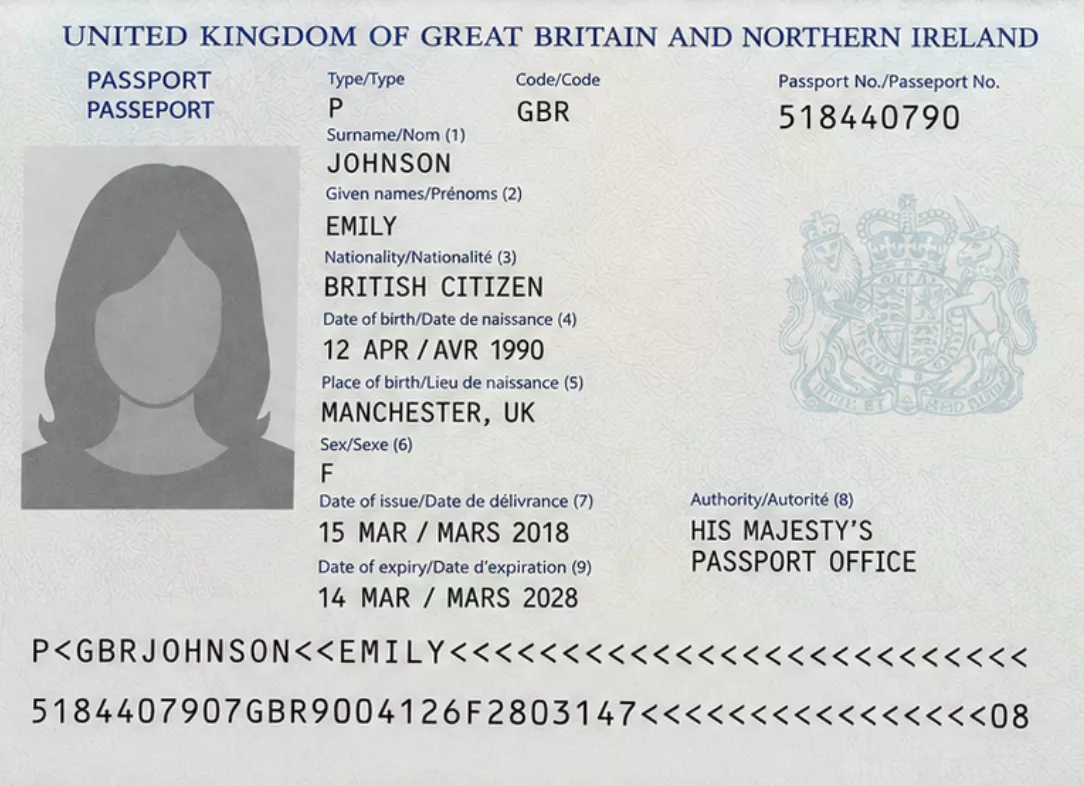
{
  "document_type":       "Passport",
  "document_number":     "518440790",
  "first_name":          "Emily",
  "last_name":           "Johnson",
  "date_of_birth":       "1990-04-12",
  "nationality":         "GBR",
  "gender":              "F",
  "place_of_birth":      "Manchester",
  "issue_date":          "2018-03-15",
  "expiry_date":         "2028-03-14",
  "issuing_country":     "United Kingdom",
  "issuing_authority":   "His Majesty's Passport Office",
  "mrz":                 "P<GBRJOHNSON<<EMILY<<<<<<<<<<<<<<\n5184407905GBR9004122F2803147<<<<<<04"
}
Typical workflows
KYC and Onboarding
Automatically extract identity data from uploaded IDs during customer or employee onboarding.
HR Identity Verification
Extract and store ID document data for employee records, work permits, and compliance checks.
Travel and Hospitality
Capture passport and visa data at check-in or booking to pre-fill reservation forms automatically.
Compliance Workflows
Extract expiry dates and document numbers for automated renewal alerts and audit trails.
Add ID extraction to any app
Install the SDK, import the ID document template, and submit your first document. Identity data is returned as structured JSON you can immediately push to your onboarding or verification system.
npm install parselyzeReady to integrate?
REST API reference, SDK examples, and webhook handler docs are available on the developer page.
Fields extracted when you parse an ID document to JSON
Standard identity fields returned as structured JSON with every request.
Frequently asked questions
Everything you need to know about ID document extraction.
What is ID document extraction?
ID document extraction is the automated process of reading structured data from identity documents such as passports, national ID cards, and driver's licenses. It returns named fields like document number, date of birth, nationality, and expiry date as clean JSON, replacing manual data entry.
Which identity documents does Parselyze support?
Parselyze can extract data from passports, national identity cards, driver's licenses, and residence permits. It reads both the visual inspection zone (VIZ) and the machine readable zone (MRZ) when present.
Does ID extraction work with photos taken on a phone?
Yes. Parselyze processes JPEG, PNG, WEBP, PDF, and TIFF inputs. Photos taken on a phone work as well as flatbed scans, provided the document is fully visible and legible.
Can Parselyze read the MRZ on a passport?
Yes. When present, the machine readable zone (MRZ) is extracted as a field. Your application can use this for cross-checking with the visual data or for direct integration with identity verification systems.
How do I integrate ID document extraction?
Create an ID document template in the Parselyze dashboard or import the ready-made one from the marketplace. Submit the document image or PDF via the REST API or Node.js SDK and receive structured JSON in seconds.
Can extracted ID data be pushed to an HRIS or KYC system?
Yes. The JSON output from Parselyze can be sent directly to any HRIS, KYC platform, or onboarding system via REST or automation tools like Zapier and Make.